
Many small and mid-sized companies still plan their year in a spreadsheet. Often it is one spreadsheet, built by one person, full of formulas nobody else wants to touch.
AI planning tools are now aimed squarely at that file. On November 2, Abacum, a planning platform based in New York and Barcelona, launched Abra, a single AI agent that takes a plain-language question and hands the work to specialist agents for modeling, analysis, reporting and data preparation.
The agent itself is not the most interesting part. The interesting part is how the work is divided.
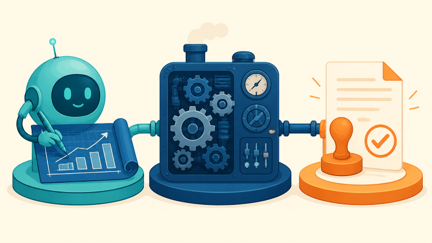
Who builds, who calculates, who approves
Abacum describes a clear split between the AI and the rest of the system:
- Abra works out what a question needs, asks for anything missing, and routes it to the right agent. Abacum’s example is a question like what it would take to reach a revenue target next year.
- Modeler, launched on October 13, turns a written request or an uploaded Excel file into a live, driver-based model on the company’s connected data.
- Abacum’s deterministic calculation engine performs every calculation, the same way it does for models people build by hand.
- Proposed changes wait for human approval, and the agents work within each user’s existing permissions.
Abra is included for existing customers at no extra cost. In plain terms, the AI proposes the structure, the software does the arithmetic, and a person signs off.

Why the final number should not come from the chat
A language model is good at reading a messy request and drafting a sensible structure. A formula or calculation engine does something different: it gives the same result for the same inputs, and you can follow how it got there. In a forecast that people will use to hire, buy stock or set prices, that traceability matters.
Microsoft’s Excel shows a similar direction. The =COPILOT() worksheet function, which placed a language model’s answer directly in a cell, stopped working on September 14, 2026. It had only ever been a preview. Results already calculated stay as cached values, but a cell that recalculates now shows a #NAME? error, and Microsoft points users to the Copilot pane instead.
Excel’s Show Changes pane also now marks which edits Copilot made, so a reviewer can tell AI changes from human ones.
Different vendors, same idea: let AI draft and edit, and keep the numbers somewhere you can trace.

The real risk is the spreadsheet only one person understands
Abacum’s own Modeler announcement names the underlying problem: in many companies, models live with one or two people, and when those people leave, nobody fully understands them.
This matches something common in business software: a spreadsheet starts as a quick fix and slowly becomes the planning system.
An AI that rebuilds that file on live data can help. But if the original has a hard-coded number, a broken link or an assumption nobody wrote down, the AI can carry it straight into a cleaner-looking model. Clean formatting is not the same as correct logic.
Practical takeaways
Before you let any AI tool rebuild your plan:
- Write down the handful of assumptions that drive it, such as growth, pricing and headcount cost.
- Check that every key number traces to a formula or a data source, not to a value someone typed in.
- Have a second person review AI-proposed changes, as you would a colleague’s work.
- Run the new model next to the old spreadsheet for one cycle and compare.
- Ask vendors directly which numbers the AI produces and which the calculation engine produces.
AI can make planning far less dependent on one person, and that is a real benefit for small teams. But a forecast is only useful if people trust its numbers. Let AI do the building and the explaining. Keep the math where you can check it.
Who in your business is the only person who really understands your planning spreadsheet?
Sources
- Abacum: Abacum Launches Abra, a Unified AI Agent for Business Planning (PR Newswire, Nov 2, 2026)
- Abacum Newsroom: Abacum Launches Modeler and Brings Agentic Modeling to Every Finance Team (Oct 13, 2026)
- Microsoft Support: COPILOT function (no longer available as of Sept 14, 2026)
- Microsoft Learn: Release notes for Microsoft 365 Copilot (Excel Show Changes attribution)